
An employee availability form records when someone can work. For an hourly team, it should show specific days and time windows, the date those hours take effect, and any temporary exceptions. Keep preferred shifts separate from the hours the employee can actually cover.
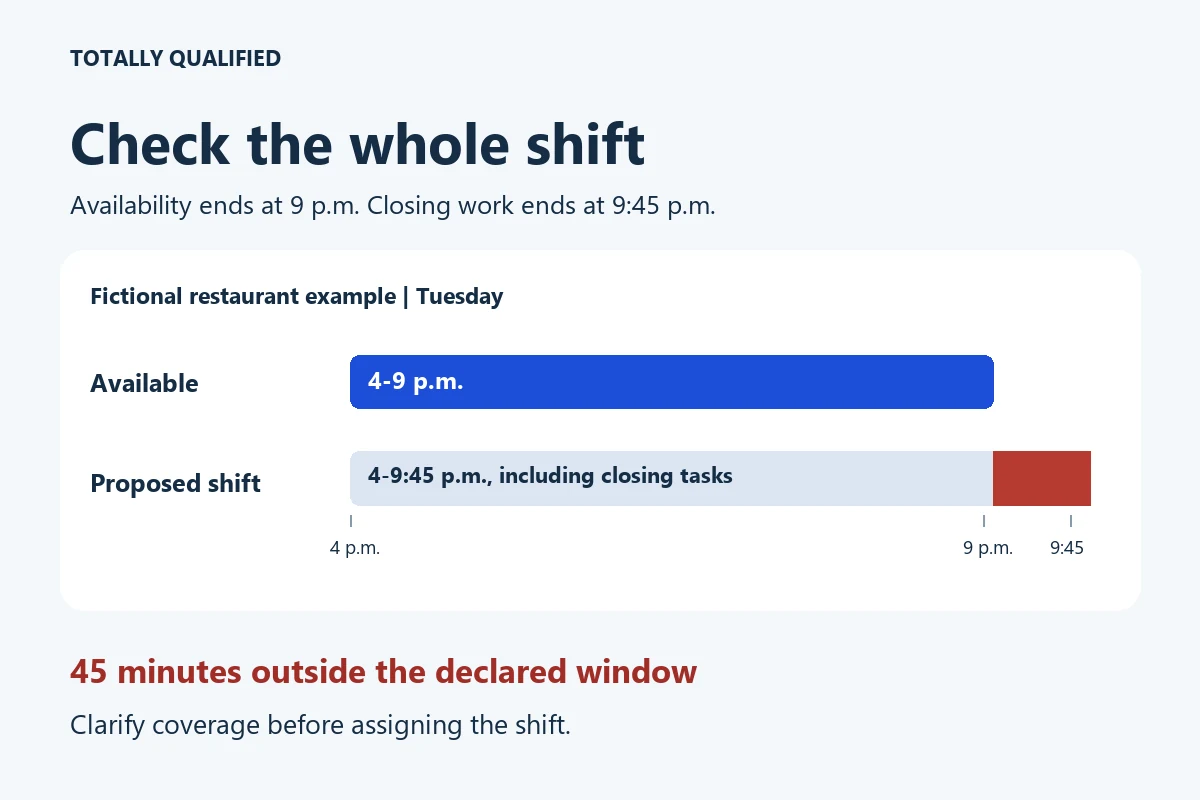
Collecting that information is only the first step. A restaurant employee available until 9 p.m. cannot cover a closing shift that routinely ends at 9:45 p.m., even if the doors close at nine. Compare the whole working shift with the form before putting it on the schedule.
This guide is for small employers scheduling hourly teams in the United States. The form and examples are original editorial resources, not records from a real employer or employee.
Free printable and fillable PDF: Download the employee availability form and manager shift-review sheet. Page 1 collects availability; page 2 helps the manager compare proposed shifts. No account or email address is required. Use a PDF reader that supports form fields, save a copy, and print either page if needed.
What to put on an employee availability form
Ask for enough detail to build a workable schedule without collecting a personal explanation for every unavailable hour:
- Name, role and work location: so the right scheduler receives the record.
- Effective dates: when the pattern starts, and whether it is ongoing or ends on a specific date.
- Worksite time zone: especially when employees cover multiple locations.
- Weekly windows: exact start and finish times, with a second window where a day is split.
- Preferences: a preferred shift or total weekly hours, recorded separately.
- Dated exceptions: one-off changes that do not replace the regular weekly pattern.
- Employee confirmation: who supplied the information and when.
Use a.m./p.m. or an agreed 24-hour format consistently. Do not use a blank cell to mean unlimited availability. In this template, a blank needs clarification; write Not available or Need to confirm when that is the actual answer.
A copyable weekly availability grid
Copy this grid into your own document if you prefer. Add the employee’s name, role, location, effective dates and worksite time zone above it. The PDF includes those fields and space for confirmation.
| Start day | Available window or status | Second window, if any | Preference, optional |
|---|---|---|---|
| Monday | |||
| Tuesday | |||
| Wednesday | |||
| Thursday | |||
| Friday | |||
| Saturday | |||
| Sunday |
How to record overnight work: use the row for the day the window starts and name the end day, such as Tuesday 8 p.m. to Wednesday 1 a.m. If those early Wednesday hours are the employee’s only Wednesday availability, note Continuation of Tuesday window only in the Wednesday row. That describes one window, not two separate shifts.
How to record a split day: write 7-11 a.m. in the first window and 3-7 p.m. in the second. Do not turn those into a single 7 a.m.-7 p.m. window; the employee has not offered the hours in between.
Example: a restaurant employee who can work evenings
The following is a fictional adult employee’s schedule. All times are local to the worksite. Availability begins November 2 and continues through December 20; the employee prefers 12-18 hours a week. That preference is not a promise of hours.
| Day | Availability | Preference |
|---|---|---|
| Monday | Not available | None |
| Tuesday | 4-9 p.m. | Dinner shift |
| Wednesday | 4-9 p.m. | Dinner shift |
| Thursday | Not available | None |
| Friday | 5-11 p.m. | None |
| Saturday | 11 a.m.-7 p.m. | Prefer lunch |
| Sunday | Not available | None |
If the restaurant needs Tuesday coverage from 4 to 9:45 p.m., this record shows a mismatch. The manager should discuss the actual finishing time, find a different assignment or arrange other coverage. Moving the form’s end time to 9:45 without employee confirmation does not resolve the mismatch.
Make the expected shifts clear earlier in hiring, too. Our restaurant job posting template helps put the role’s schedule into the advertisement.
Use the manager sheet to check actual shifts
Page 2 of the download asks for the proposed shift, declared availability, and a result: Fits, Does not fit or Clarify. These fictional examples show what the comparison catches:
| Proposed work | Declared availability | Result and next step |
|---|---|---|
| Restaurant: Tuesday 4-9:45 p.m., including closing tasks | Tuesday 4-9 p.m. | Does not fit. The last 45 minutes fall outside the window. Clarify coverage. |
| Residential cleaning: Thursday 8:30 a.m.-2:30 p.m., including the required team meeting and return to base | Thursday 9 a.m.-3 p.m. | Does not fit. The required start is 30 minutes too early. Check the whole route’s working times. |
| Commercial cleaning: Tuesday 8 p.m.-Wednesday 1 a.m. | Tuesday 8 p.m.-Wednesday 1 a.m. | Fits the availability window. Check other scheduling requirements before assigning it. |
| Retail: Saturday 10 a.m.-4 p.m. | Saturday 7-11 a.m. and 3-7 p.m. | Does not fit. The employee is unavailable from 11 a.m. to 3 p.m.; two windows do not form one continuous window. |
A time-window match is one check. It does not establish that the employee is qualified for the role, that total hours or rest periods are appropriate, or that the assignment complies with applicable rules. Confirm those separately. The worksheet is a manual aid, not a scheduling or payroll calculator.
For cleaning roles, define reporting locations and actual working times in the cleaning job posting. A customer appointment time may not include every required duty before or after the visit.
Ask about the schedule without asking for private reasons
A practical prompt is: This role includes Tuesday and Wednesday shifts ending at 9:45 p.m. What hours can you work on those days? Use the same job-related questions consistently and record the answer accurately.
Do not add required boxes asking for childcare arrangements, medical diagnoses or religious observance. The EEOC advises against non-job-related pre-employment questions about marital status and children or religious affiliation and beliefs. Its disability guidance also explains restrictions on pre-offer disability-related inquiries.
A worker may need to raise an accommodation or leave request. Provide a separate route to the appropriate manager or HR contact; do not treat the ordinary availability grid as the decision on that request. Limit access to completed forms to the people who need them for scheduling rather than posting personal records for the whole team.
Keep availability separate from the issued schedule
The form tells you when someone says they can work. The issued schedule tells them when they are assigned. Neither a preferred hours range nor an open time window guarantees a particular number of paid hours. If that question is still unresolved during hiring, see what to ask about guaranteed part-time hours.
The Department of Labor explains that the FLSA does not address flexible work schedules. That does not settle every employer’s obligations: state or local rules, agreements and other protections may apply. For example, Oregon’s predictive scheduling guidance describes advance-schedule requirements for covered large retail, hospitality and food-service employers. Those requirements are not a nationwide rule for every small business.
Do not use the form as a waiver of scheduling protections or as automatic permission to change an already issued shift. Check the rules for the location and workforce before setting a change process. This template is a planning resource, not a substitute for those requirements.
When an employee changes their availability
Ask whether the change is ongoing or applies only to named dates. Record the new effective date and confirm what happens to any shifts already issued. Do not assume that receiving the form cancels an existing shift or that reviewing it settles an accommodation request.
A short confirmation can identify the remaining question:
Thanks for the update. I have your new availability as Wednesday 5-9 p.m., effective November 16. The November 18 schedule currently ends your shift at 9:45 p.m. I will follow up about that assignment; this message does not confirm a revised shift.
This is a fictional example to adapt to the workplace’s process. Keep the current form and its submission date identifiable so a scheduler does not work from an older copy. Employees who need help wording an update can use our guide to telling a manager their availability has changed.
Before building the next schedule, check the effective dates, resolve blanks, and compare every proposed shift’s full start and finish with the declared windows. Give the employee the issued schedule through the workplace’s normal channel; collecting a form is not the same as communicating their shifts.